
Remote Work and Data Loss: Take Control of Your Microsoft 365 Data
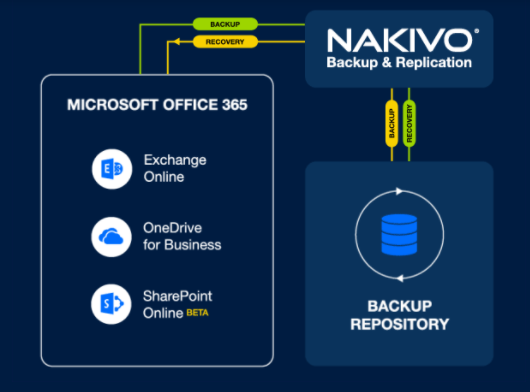
Cloud Backup & Replication, Cloud, Microsoft 365, Microsoft Exchange, Nakivo, nakivo backup and replication, webinarMany organizations and businesses have started remotely during the pandemic and stored their critical on-premises as well as on the cloud locations. They have migrated or stored on-premises to Exchange Online, SharePoint Online, and OneDrive for Business.
NAKIVO Backup & Replication delivers reliable and flexible protection for Microsoft Office 365 to ensure that your mission-critical data is accessible and recoverable at all times. Use Backup for Microsoft Office 365 to back up your Exchange Online mailboxes and OneDrive for Business user accounts. When the need arises, instantly restore emails, attachments, files, and folders back to the original or custom locations.
Nakivo is going to organize a webinar that will discuss the importance of taking backups of your critical data to public cloud architecture. Register here for Webinar. There are 3 dates in December, the 8th, 9th, and 10th, and each in a different time zone.
To deliver the highest possible reliability and accessibility of backup data, NAKIVO Backup & Replication can store Microsoft Office 365 backups onsite. With such an approach, customers have full control of their data regardless of the account’s availability and can use it for recovery at a moment’s notice. It can:
- Protect virtual, physical, cloud, and SaaS environments.
- Send backups to the cloud, tape, or on-premise local devices.
- Increase backup performance, improve reliability, and speed up recovery.
- Simplify administration and enhance security with job scheduling and automation, access controls, and Active Directory integration.
What it covers
- The key reasons for backing up Microsoft 365 data
- How to keep business data safe and reduce financial and reputational risks as a result of data loss
- How to use NAKIVO Backup & Replication to protect Microsoft 365 data for remote workers
- Use cases and a live demo
- Q&A
Links:
Download Free Trial where you can get Nakivo 15 days trial (and you can extend this period if you want to, by e-mail).

Author: Nisar Ahmad
Systems Engineer, double VCP6 (DCV & NV), 4 x vExpert 2017-20, and the owner of My Virtual Journey, with experience in managing a Datacenter environment using VMware and Microsoft Technologies. This blog mainly covers virtualization and cloud technologies but also covers some other technologies such as Cyber Security, Quantum Computing, etc.