
What is Assignable Hardware in vSphere 7 and How It Works?
Cloud, VMware assignable hardware, Cloud, content library, improved DRS, NVIDIA vGPU, Product Review, vCenter Server, VMware, vSphere 7, vSphere 7 with Kubernetes
VMware vSphere is an enterprise-level data center virtualization solution that is being used by businesses for more than a decade with a lot of new features and services with every new release.
During this pandemic situation all over the world, VMware has still managed to produce one of the world’s best data center virtualization solutions vSphere 7 (announced in March 2020) with a lot of new features.
The newer version vSphere 7 is available in two editions in the market:
- vSphere 7 – The new generation of vSphere for traditional applications and workloads.
- vSphere 7 with Kubernetes – The new generation of vSphere for containerized applications and available through VMware Cloud Foundation (VCF).
Features of vSphere 7
The following are some exciting features that are introduced with the new VMware vSphere 7 release.
vSphere with Kubernetes
The first coolest feature of VMware vSphere 7 is vSphere with Kubernetes, formerly known as Project Pacific where Kubernetes is now built-in with vSphere that offers developers to develop their cloud-native and modern apps using the same industry standards and tools. vSphere administrators can manage the Kubernetes infrastructure using the same skills and tools that they have already developed around the existing vSphere environment. To handle both Kubernetes and vSphere environments at the same time, VMware introduced a new vSphere construct called Namespaces that allows vSphere administrators to create and manage logical resources, policies, and permissions for enabling application-aware methodology.
Improved DRS
VMware introduced an improved Distributed Resource Scheduler (DRS) that is responsible to better serve both VMs and containerized environments. Previously, DRS was used to focus on the cluster state and vMotion was recommended to balance the virtual data center environment.
A newer and improved DRS has a different approach as it computes a VM’s DRS score on the hosts and moves the VM(s) to a host that provides the highest VM DRS score, without balancing the host’s load, and prioritizing the VM’s happiness rather than focusing on the ESXi host utilization, this DRS score is calculated after every 60 seconds and resulted in a much more granular optimization of physical resources.
vSphere Lifecycle Manager
vSphere Lifecycle Manager suite offers several new features to perform better lifecycle operations while deprecating the vSphere Update Manager (VUM), and have a paradigm shift in both ESXi host and vCenter configuration management. Following are some new features and functionalities introduced in the new vSphere Lifecycle Manager:
vCenter Server Profile: Allows vSphere admins to create configurations, apply them, and monitor their desired state to ensure that every configuration is standardized and patched.
Cluster Image Management: Allows vSphere admins to create cluster-level images while dictating the hosts about configurations within the cluster.
vCenter server Update Planner: Provides native tools that help to plan, discover, and upgrade the virtual environment successfully while receiving notifications when an upgrade is available in the vSphere Client. It only works with vSphere 7 (hardware version 17) and onward versions or updates. You cannot upgrade from vSphere 6.x to vSphere 7.
Content Library: No longer need to attach an NFS share to store ISOs, templates, etc. you can store ISOs and templates at a centralized location without configuring an NFS share for the content library.
Intrinsic Security
VMware introduced a new security feature called Intrinsic Security in vSphere 7. They have also introduced vSphere Trust Authority (vTA) that establishes trust from bare-metal to the workload in the entire stack. vTA is managed by creating a hardware root of trust with a small cluster of ESXi hosts that are managed separately and takes over the attestation task of the hosts that are being done using UEFI Secure Boot, Trusted Platform Module (TPM) of the server, and external service work together to verify the authentication process of the host cryptographically.
In vSphere 7, vTA is responsible to enforce the rules on trusted hosts while taking over the communication with the Key Management Systems (KMSes), simplifying the risk auditing, connecting to the KMSes, and denying access to secrets of the hosts that fail attestation, where encrypted VMs can’t be run without those secrets.
Simplify vCenter Server Architecture
In the new version of vSphere 7, you can neither deploy an external Platform Services Controller (PSC) nor vCenter Server for Windows, if you have any type of deployment in your environment, vSphere 7 will automatically migrate to vCenter Server Appliance (VCSA) with an embedded PSC without multi-step process.
Assignable Hardware
One of the most prominent features of vSphere 7 is Assignable Hardware, and in this post, we’ll also focus on this innovation. vSphere 7 offers a pretty flexible methodology to assign hardware accelerators to the workloads while identifying hardware accelerators by the device’s attributes instead of identifying hardware addresses. This approach allows abstraction of PCIe device with compatibility checks to verify that ESXi hosts have assignable hardware to fulfill the requirements of the hosted VM(s).
It initially integrates with Distributed Resource Scheduler (DRS) for placement of hardware accelerator-enabled workloads, and vSphere High Availability (HA) capabilities will be brought back by assignable hardware to recover hardware accelerator-enabled workloads if assignable devices are available in the cluster, it also improves the workload availability.
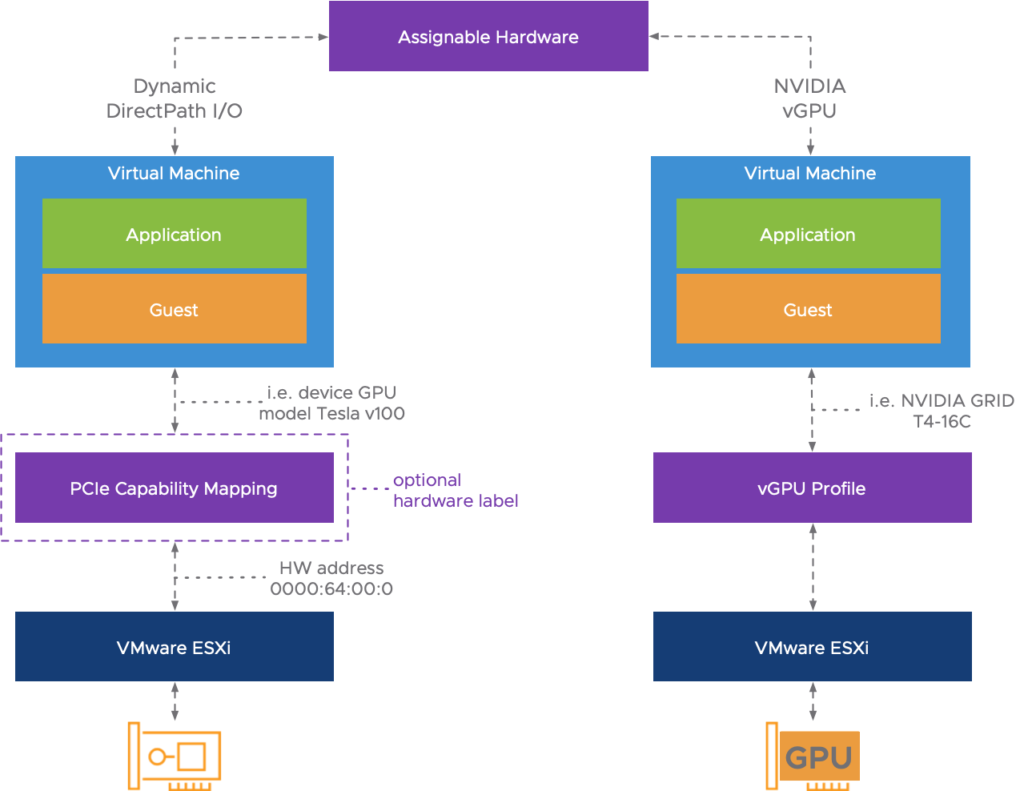
Figure: Thanks to VMware
There are two main consumers of assignable hardware features; The new Dynamic DirectPath I/O and NVIDIA vGPU.
In vSphere 7, Dynamic Directpath I/O is introduced as a part of the Assignable Hardware framework, and the consumer is presented with the following three options while configuring a VM to use a PCIe device:
- DirectPath I/O: A legacy feature to passthrough a PCIe device without any integration with vSphere HA and DRS.
- Dynamic DirectPath I/O: New solution that enables assignable hardware to passthrough PCIe device without a hardware address that is mapped directly to the VM configuration. When “Select Hardware” is selected, all PCIe devices that are available for passthrough are listed in the drop-down menu, and when a device is selected, assignable hardware with the DRS will automatically find a suitable host to configure hardware accelerator.
- NVIDIA vGPU: NVIDIA vGPU is another consumer of assignable hardware that is co-developed with NVIDIA to integrate on VMware vSphere environment that offers partial, full, or multiple vGPU allocations to workloads.
Conclusion
VMware vSphere 7 is a game-changing release that has a bigger focus on making customer’s lives easier and better while offering security and lifecycle improvements, keep pushing the boundaries of what is possible. vSphere 7 is a technology that is introduced to manage a hybrid cloud environment and with the addition of Kubernetes, vSphere will be considered as the conduit for developers to develop modern and cloud-native applications.
Assignable hardware is a newly introduced feature in vSphere 7 that will greatly improve the utilization of hardware accelerators and bring back the vSphere DRS and HA capabilities for VMs to configure with a PCIe device.

Author: Nisar Ahmad
Systems Engineer, double VCP6 (DCV & NV), 4 x vExpert 2017-20, and the owner of My Virtual Journey, with experience in managing a Datacenter environment using VMware and Microsoft Technologies. This blog mainly covers virtualization and cloud technologies but also covers some other technologies such as Cyber Security, Quantum Computing, etc.